Ubuntu's Twitter Hack: A Crypto Scam Disguised as an AI Agent
After enduring a five-day distributed denial-of-service (DDoS) attack on its web infrastructure, Ubuntu faced yet another blow: its official Twitter account was compromised. The attackers posted a deceptive tweet promoting a fake AI agent called 'Numbat,' which actually led to a cryptocurrency phishing site. This Q&A breaks down the incident, how the scam worked, and what it means for users.
What exactly happened to Ubuntu’s Twitter account?
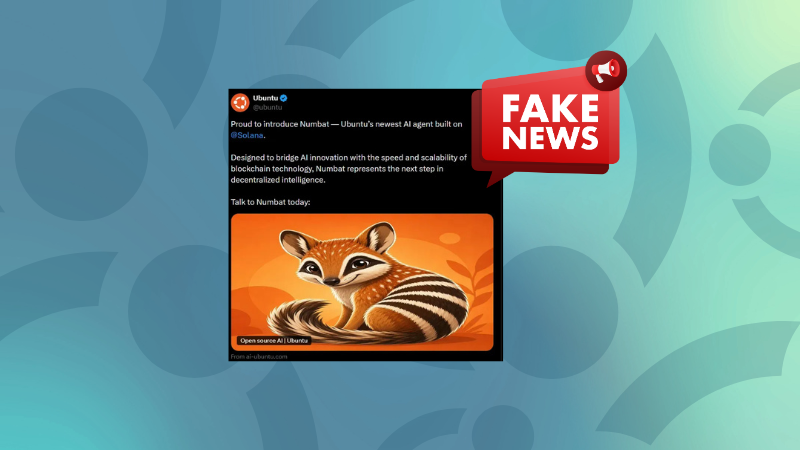
On [date], a now-deleted tweet appeared on Ubuntu’s official Twitter feed, announcing a new AI agent named 'Numbat.' At first glance, it seemed legitimate—it referenced Ubuntu’s recent AI ventures and used the codename of Ubuntu 24.04 (Noble Numbat). However, the tweet was part of a thread with replies disabled, preventing users from warning others. Cybersecurity firm Cyber Kendra documented the incident before the tweet was removed. The account had been compromised, likely through a phishing attack or credential theft, following the prolonged DDoS that had already strained Ubuntu’s resources. The attackers exploited the brand’s credibility to push a crypto scam, adding to the company’s recent security woes.
How was the tweet designed to deceive users?
The tweet played on psychological triggers by combining trending topics like AI and blockchain. It claimed the agent was built on Solana, a legitimate blockchain platform, and used buzzwords like 'decentralized' to build false legitimacy. The visual included an orange numbat, subtly echoing Ubuntu’s branding. The displayed URL was ai-ubuntu.com, dangerously close to the official ai.ubuntu.com (which doesn’t exist but still appears credible). The thread’s replies were closed, so even vigilant users couldn’t publicly flag the scam. By mimicking official style and referencing recent Ubuntu news, the tweet aimed to lower users’ guard, making them more likely to click through without suspicion.
What did the phishing page look like?
The linked website was a near-perfect replica of a typical Canonical/Ubuntu page. It featured official-looking menus, links to real Ubuntu projects, and professional design. Only upon closer inspection—or when clicking buttons like 'Check eligibility' or 'Explore Ubuntu AI'—did the scam reveal itself. The page prompted users to connect their crypto wallet, claiming that 'Early ecosystem participants may qualify for future $UM allocations' with a 'Snapshot approaching' countdown. The site’s domain, ai-ubuntu.com, was one letter off from an official subdomain, making it easy to miss for someone not paying close attention. This cleverly constructed fake site could fool even experienced users who trusted the official Twitter source.
Why was the fake agent named 'Numbat'?
'Numbat' is the animal codename for Ubuntu 24.04 (Noble Numbat), which was already in development or recently released at the time of the attack. The attackers intentionally used this familiar name to associate the scam with a genuine upcoming Ubuntu release. By linking the fake AI agent to a known codename, they increased the likelihood of users believing the announcement was authentic. The orange-and-purple color palette of the numbat graphic also matched Ubuntu’s branding. This careful attention to detail shows that the scammers monitored Ubuntu’s communication and product roadmap to maximize credibility. In essence, they weaponized the trust built around Ubuntu’s release naming convention.

How did the scam progress from tweet to wallet connection?
The attacker’s strategy unfolded in stages. First, the compromised tweet teased an innovative AI agent, sparking curiosity and leveraging Ubuntu’s recent AI focus. Second, the thread included a link to a lookalike website, where users saw professional design and real Ubuntu links, reinforcing trust. Third, the page displayed text about a token allocation ('$UM') and a snapshot deadline, creating urgency. Finally, when users clicked the call-to-action buttons, they were asked to connect their crypto wallet (e.g., MetaMask, Phantom). Once connected, the scam could drain funds or approve malicious transactions. The replies were disabled throughout, so no one could post warnings in the thread itself. This multi-step funnel moved users from brand trust to financial risk without obvious red flags.
What can users do to protect themselves from such scams?
Always verify unexpected announcements from official accounts, especially those involving cryptocurrency or wallet connections. Check for verified status, but note that even verified accounts can be compromised. Look for minor URL discrepancies—like ai-ubuntu.com vs. the real domain. Hover over links before clicking. Never connect a crypto wallet or enter private keys after clicking a promotional link. Cross-reference with the company’s official blog or support channels. Enable two-factor authentication on your own social media and monitor for any unusual activity. If you spot a suspicious tweet, alert the platform’s support and the company directly. Finally, be wary of posts that close replies: that’s a common tactic to prevent public debunking. Staying skeptical and doing a quick sanity check can save you from falling for sophisticated impersonations.